PMMVY check status by Aadhaar card number allows beneficiaries to track their application and payment without needing to remember a separate application ID. Using your 12-digit Aadhaar number, you can look up whether your name is in the system, which installments have been released, and whether any payments have been credited to your bank account. This guide covers every method available in 2026 to check PMMVY status by Aadhaar — from the citizen portal login to the AWC verification route. Consequently, you will know exactly where your application stands without a single unnecessary trip to any office.
Method 1 — PMMVY Check Status by Aadhaar via Citizen Login
The most complete way to check PMMVY status by Aadhaar is to log in to your citizen account. The login itself uses the mobile number linked to your Aadhaar, effectively making Aadhaar the root identity for the entire process.
- Open pmmvy.wcd.gov.in on your phone or computer
- Click Citizen Login
- Enter the mobile number registered with your Aadhaar and click Send OTP
- Enter the OTP to access your dashboard
- Your Aadhaar is automatically linked to your record — all application details and payment statuses appear immediately
After login, the dashboard shows your full beneficiary record including: registration date, AWC name, each installment’s status (pending, released, or credited), release dates, and payment amounts. Furthermore, the payment section shows the transaction reference number for each released installment, which you can cross-check with your bank.
Method 2 — Direct Aadhaar Status Lookup Without Login
The PMMVY portal offers a public status check option that does not require full citizen login in many states. This is the method most directly described as PMMVY check status by Aadhaar card number.
- Go to pmmvy.wcd.gov.in
- Look for Beneficiary Status, Check Status, or Track Application on the homepage or navigation menu
- Enter your 12-digit Aadhaar number in the provided field
- Enter the registered mobile number when prompted
- Submit to view your application record and payment status
Note that this public lookup shows limited information compared to the full citizen login dashboard. Additionally, availability varies by state — some state portals have enabled this feature while others require full login. Therefore, if the public lookup is unavailable in your state, proceed with Method 1.
Method 3 — Check PMMVY Payment Status by Aadhaar at Bank Branch
If you want to confirm whether a PMMVY installment has actually been credited to your account, your bank branch can verify this using your Aadhaar number. Most nationalised banks have DBT transaction lookup tools at their branches that show all PFMS credits linked to your Aadhaar-seeded account.
Visit your bank branch with your Aadhaar card and passbook. Ask the bank officer to check for any PFMS or DBT credits under your Aadhaar seeding. The system will show the sender (PMMVY/WCD), amount, and credit date if a payment has been processed. Moreover, this method confirms whether a payment released by the portal actually reached your bank — which the portal status alone cannot always confirm.
What the PMMVY Status Results Mean
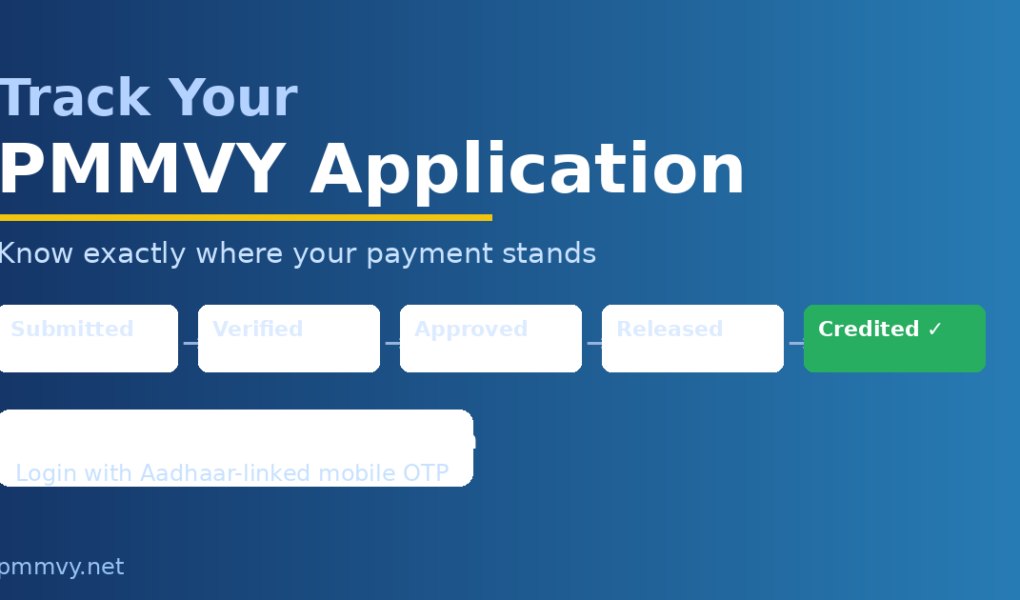
After performing the PMMVY check status by Aadhaar, the results show specific status codes for each installment. Understanding each code helps you decide whether to wait or take action.
- Pending / Not Verified: Application submitted but AWW has not yet verified — visit AWC if more than 10 days have passed
- Verified: AWW has approved — waiting for supervisor and district officer processing
- Released: Payment dispatched from treasury — allow 3–5 banking days to appear in bank account
- Credited: Payment successfully received in your bank — confirm in passbook or bank app
- Rejected: Application or installment rejected — check the rejection reason and read the PMMVY application rejected guide
PMMVY Status by Aadhaar — What If No Record Found
If you check PMMVY status by Aadhaar and the system returns no record, it means either your registration was not completed successfully or your Aadhaar number was entered incorrectly during registration. In this case, visit your Anganwadi centre immediately with your Aadhaar and MCP card. The AWW can confirm whether your application exists in their system and either correct the record or register you afresh.
Additionally, if you registered offline and the AWW has not yet entered your application into the portal, no record will appear in the digital status check. Therefore, asking the AWW directly is the most reliable way to confirm whether your offline registration was processed. Use the PMMVY status check tool for a step-by-step guide through the portal.
Frequently Asked Questions — PMMVY Check Status by Aadhaar
How do I check PMMVY status by Aadhaar card number?
Go to pmmvy.wcd.gov.in, use the Beneficiary Status or Check Status option, and enter your 12-digit Aadhaar number with your registered mobile. Alternatively, log in with your Aadhaar-linked mobile OTP for full dashboard access.
Can I check PMMVY payment status by Aadhaar without login?
Yes, in most states. The Beneficiary Status section on the portal homepage allows status lookup by Aadhaar without full login. If unavailable in your state, log in with mobile OTP instead.
Why does PMMVY show no record when I check by Aadhaar?
No record means registration was incomplete or your Aadhaar was entered incorrectly during registration. Visit your AWC with Aadhaar and MCP card to confirm and fix the issue.
How do I check if PMMVY payment reached my bank account?
Check your bank passbook or mobile banking for PFMS or DBT credits. You can also visit your bank branch with Aadhaar to ask them to verify DBT credits linked to your Aadhaar-seeded account.
What is the difference between PMMVY status Released and Credited?
Released means the district officer approved the payment and sent it through PFMS — it is in transit. Credited means the amount has been successfully transferred to your bank account. Allow 3–5 banking days between Released and Credited.